

Google News added a directory for custom sections and an easy way to create your own custom sections. Until now, the only way to add a section to Google News was to perform a search and click on "create custom section" at the bottom of the search results page.
Now you can click on "Add a section", find your favorite sections or create new ones.

Google doesn't offer too many options when you create a section: type a list of keywords, restrict the results to a national edition or to the sources from a certain location.
For example, you can create a section for Google-related news by entering [google, gmail, chrome, android] or any other combination of keywords related to Google. You could also create a section about web browsers by entering [browser, chrome, safari, opera browser, firefox, internet explorer].

"Personalized News enables you to get news tailored specifically to your interests. You can personalize your own Google News homepage by creating Custom Sections from your favorite searches and mixing and matching existing standard sections from the regional and language editions of Google News. After defining your Custom Section, you have the option to "Publish this section to the directory" by checking the box provided. This will add your Custom Section to the Custom Section Directory, where other users can add it to their Personalized News page, as well as rate your section," explains Google.
Custom Sections Directory for Google News
Google Dashboard
Google Dashboard is a new service that shows a summary of the data stored with a Google account. You'll soon find a link to Google Dashboard in the "personal settings" of the "my account" page.

The dashboard lists some of the information associated with the Google services you use: your name, your email address, the number of contacts, the number of conversations in your Gmail inbox, your Google profile, the most recent entries from the web history etc. It's a long answer to the question: "What does Google know about me?".

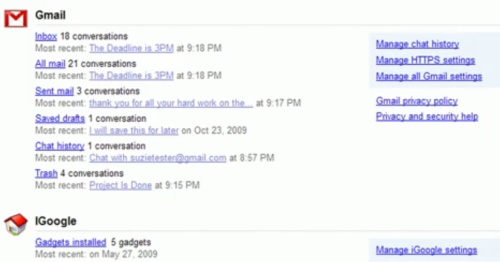
More information about the new service in a YouTube video that was supposed to be "embargoed until 2am PT, November 5th".
Update: Google Dashboard is now available at http://www.google.com/dashboard.
Google Toolbar's Features in Google Chrome?
Google received many complaints that Google Toolbar is not available for Chrome, so it created a page meant to convince users that "many Toolbar features are already built right into Google Chrome".
The page explains that Google Chrome already includes a search box, a pop-up blocker, a new tab page, a spell checker and it offers a list of bookmarklets that let you create bookmarks, translate web pages or view Sidewiki annotations. Some of the explanations are plain wrong:
"Like Toolbar's 'AutoFill' button, Google Chrome shows you text you've previously entered on websites, to save you time and typing."
Obviosly, Google Toolbar's autofill feature doesn't have anything in common in Google Chrome's autofill, other than the name. Like most browsers, Google Chrome auto-populates the text field with information you've entered when you visited the same pages before. Google Toolbar lets you save personal information (name, email, address, credit card information) and complete web forms with one click.
"Google Chrome's built-in spell-checker, similar to Toolbar's 'Spell check' button, automatically checks your spelling whenever you fill out a web form."
That's true, but Google Toolbar uses an online service for spell-checking and the results are much better. Try typing "Engsh" in Chrome and you'll see that the suggestions are "Eng sh" and "Eng-sh", which Google Toolbar's first suggestion is "English".
"The find bar feature in Google Chrome works like the Toolbar 'Word find' button. Matches to your search term are automatically highlighted on the page. Plus, you can use the yellow markers on the scrollbar to quickly see where all the matches are located on the page."
Google Chrome's find bar doesn't work like the Toolbar's highlighting feature: the keywords don't show up automatically when you perform a search and you can't find the occurrences of the individual keywords.
I think it's a bad idea to claim that Google Chrome has many features from Google Toolbar and to list some features that are available in many browsers, including Internet Explorer.
The reason why Google Toolbar is not available for Google Chrome is that Google's browser doesn't have an extension API, at least not in the stable builds. The extension API is still a work in progress.
"We're working with the Google Chrome team to develop a Toolbar extension, as well as bring some of our most popular features to Google Chrome," says Brian Rose, who works on the Google Toolbar team.
Google Talk to Add Video Conferencing
Gmail Chat, the web-based version of Google Talk, added last year voice and video chat. The feature is now available in iGoogle and orkut, but it will probably be added to other Google services, as well.
SFGate reports that Google will improve the service significantly in the coming months.
Gmail's voice and video chats are now limited to one-to-one communications, but Google wants to broaden that capability to more than two participants and make it more robust all around for Apps.
"This [current Gmail capability] is the first step in a much broader set of features we hope to roll out over the next six to 12 months around video [and voice] chat capabilities," said Rishi Chandra, a Google Apps product manager. "It's a great opportunity for us to push that space along."
It's not clear whether Google plans to integrate Marratech's video conferencing software, acquired in 2007.
Other features that will be added to Google's services: "intelligent meeting scheduling in Google calendar", "intelligent workflow in the [Google Docs] applications", "lots of new functionality being developed especially around formatting" in Google Docs.
Google Docs Labs?
A Google Docs error message has an interesting suggestion: "If you are running a Google Docs experiment, turn it off."
Google Docs will probably add a Labs section with experimental features, much like Gmail Labs and Google Calendar Labs.
Here's what I'd like to see in the list of experiments: document pagination, chat sidebar in all Google Docs services, limited editing mode, integration with Google Scholar, autofilter and better conditional formatting for Google Spreadsheets.
Some of the most popular suggestions for Google Docs: drag and drop image placement, more page formatting options, mobile editing, integration with Gmail and an image editor.


