SEO Tools - Advanced Meta-Tags Generator

Thursday, December 10, 2009

Google is making some changes on how automated search results are handled, and it is causing some of our tools to not operate correctly. We apologize for any inconviences this has caused, and we are working on ways to make our tools functional again.

The Advanced Meta-Tags Generator helps you add Meta-Tags to your site. Meta Tags make your website more visible. Many search engines read them from your site when you submit it to them. To generate the Meta-Tag code for your site, just fill out the form below and let our META tag generator create the code for you.
Add the Advanced Meta-Tags Generator to your web site FREE!


Advanced Meta-Tags Generator Tool © SEO Chat™

Title
The Title Tag must contain no more than 70 characters (generally, 100 characters may be indexed).

Author
The Author Tag is for the person who wrote the material for the site.

Subject
The Subject Tag is for what your site is. Business, music, hobby, cars. Use up to 100 characters.

Description
The Description Tag can have up to 150 characters (generally, 200 to 250 characters may be indexed, though only a smaller portion of this amount may be displayed).

Classification
The Classification tag is similar to description but more in detail.

Keywords
In the Keyword tag use everything you think someone will search for to find your site. Use 200 characters.

Geography
Where are you located? Full Address

Language
Is your site in English, Spanish, French.....?

Expires
Use "never" unless your site will expire. (Eg. Tue, 18 Apr 2006 14:57:09 GMT | Note: Requires RFC1123 date as shown here

Cache Control
Cache control level.

No Cache
This directive indicates cached information should not be used and instead requests should be forwarded to the origin server.
Yes
No

Copyright
Who is the Owner of the site, Company Name

Zip Code
Your Zip Code

City
Your City, Town

Country
Your Country, use all names; USA, United States, United States Of America, America, etc.

Designer
Webmaster name

Publisher
Owner, Webmaster, Company Names.

Revisit-After
Tell search engine how often this page updates. (Eg. 21 days | Note: Most search engines do not support this Meta Tag)

Distribution
Use [Global] unless it is a [Local] only site.

Robots
The values ALL and NONE set all directives on or off: [ALL=INDEX,FOLLOW] and [NONE=NOINDEX,NOFOLLOW].

MS Tags
Do you want Microsoft products to automatically generate smart tags on your web pages.
Yes
No

Enter Captcha To Continue
To prevent spamming, please enter in the numbers and letters in the box below

Report Problem with Tool.


AdSense Preview


AdSense Preview Tool © SEO Chat™


URL
Enter URL

Ad Format
Select Google AdSense Ad Formats.

Enter Captcha To Continue
To prevent spamming, please enter in the numbers and letters in the box below


Report Problem with Tool.


SEO Tools - Adsense Calculator

Google is making some changes on how automated search results are handled, and it is causing some of our tools to not operate correctly. We apologize for any inconviences this has caused, and we are working on ways to make our tools functional again.

The AdSense Calculator helps Google AdSense affiliates understand what affects their earnings by letting them experiment with values.
It also allows Google AdSense users to take their current statistics and calculate how much they can expect to earn daily, monthly and yearly. Site owners who are considering implementing AdSense on their site(s) can also use this tool to estimate what results they are likely to see.

Daily Page Impressions
Daily page impressions indicate how many times ads are shown per page. You can use your average, anticipated, or current daily page impressions for this

Click Through Rate (CTR)
This figure represents how many visitors actually click your advertisements. You can find this easily on your Google AdSense stats page labeled "CTR." The average rate is estimated to be about 1.5%.

Cost Per Click (CPC)
Your CPC is the average of how much you get paid for someone clicking one of your advertisements. To find your average CPC take you’re the amount of money you have earned from AdSense (daily, monthly, or all time) and divide it by your total clicks (daily, monthly, or all time).


Add the Adsense Calculator to your web site FREE!


Adsense Calculator Tool © SEO Chat™

Page Impressions
Daily Page Impressions

Click Through Rate
Click Through Rate (%)

Cost Per Click
Cost per click ($)

Enter Captcha To Continue
To prevent spamming, please enter in the numbers and letters in the box below

Report Problem with Tool.


Google Cloudboard

Saturday, November 21, 2009

Google tests a service called Cloudboard, an online clipboard that should make it easy to copy data between Gmail, Google Docs and other Google services. The service is not publicly available yet, but there are many references to it.

An internal feedback form (update: Google disabled the form) describes Cloudboard as a "server-side clipboard for Google Apps". Google provides an example of copying data from Google Spreadsheets to Google Docs: "if you copy a formatted cell range in Trix (cell border, colors, etc.) and then paste into Writely, it's transformed into a comparably-styled HTML table."

Google's feedback form includes many other examples: pasting excerpts from Google Spreadsheets to Gmail, copying multiple images from Picasa Web Albums, copying YouTube videos, copying an event and pasting it into Google Docs or Gmail, pasting copied items from Google Image Search, copying maps into Google Docs etc.

I've always thought that Google Notebook will be Google's web clipboard, but now that the service has been discontinued, Cloudboard will be the bridge between Google's services.


Decode Google's Barcode Doodle

Decode Google's Barcode Doodle


Why would Google replace its logo with a barcode? Probably because barcodes were invented 60 years ago. "This invention relates to the art of article classification and has particular relation to classification through the medium of identifying patterns. It is an object of the invention to provide automatic apparatus for classifying things according to photo-response to lines and/or colors which constitute classification instructions and which have been attached to, imprinted upon or caused to represent the things being classified," explains the patent.

To decode the doodle, upload the image to onlinebarcodereader.com and you'll notice that it uses Code 128 to encode "Google". There's also an online barcode generator.


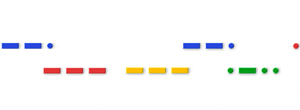
It's not the first time when a doodle encrypted Google's name: Samuel Morse's birthday and Louis Braille's birthday were other opportunities for cleverly hiding Google's logo.

 
Theme by New wp themes | Bloggerized by Dhampire