

Google has a small music search engine that shows information about artists, albums and songs. You can use the music: operator in Google's search box to access the service. Unfortunately, the information is outdated, the links to reviews are broken and there's not much to see.
After many years of decay, Google decided to improve the service. CNet reports that Google will launch the new version of Google Music Search next week, in partnership with Lala and iLike. "The way One Box will work is that a person who keys in the names U2 or Coldplay, for example, will find a thumbnail photo of the artists, background information, as well as a listing of the music that they can preview."
"The new Google music offering will allow users to stream an entire song via a link from La La Media Inc.'s Lala.com, or a sample from MySpace's music site iLike.com. The Lala link on the Google page will let users listen to a song once free of charge. In addition to offering a free streaming link, the new arrangement will offer options to pay 10 cents for an online-only version or about $1 to download an MP3," says the Wall Street Journal.
TechCrunch has some screenshots of the OneBox and the interface resembles Yahoo's music artist shortcut. Last year, Yahoo partnered with Rhapsody to allow users to play up to 25 full songs a month.
Here are some screenshots of Google Music Search as it looks today:
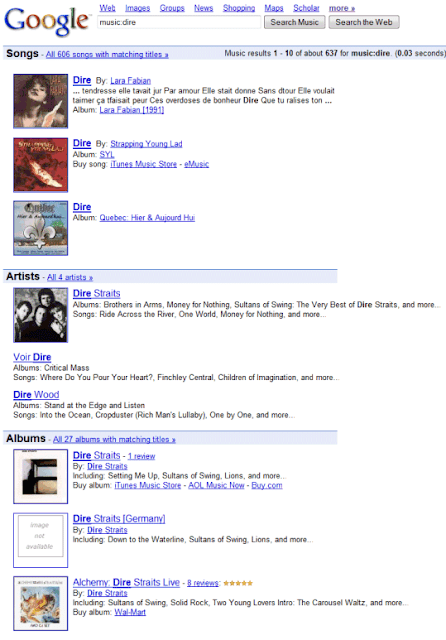


Google's most popular music-related service is YouTube and it's surprising that YouTube doesn't offer a better experience for watching music videos. YouTube could easily add information about music artists, lyrics, album arts, music charts. Later this year, YouTube will launch Vevo, a site that will feature Universal's music videos.
Enhanced Google Music Search
Even More Results from a Site
Like most search engines, Google doesn't show too many results from a domain on a single search results pages. Until recently, Google displayed at most 2 consecutive results from a site, followed by a link that restricted the results to that site.
Some recent results show that Google adjusted this policy and it now allows 3 or even 4 consecutive results from the same site.


Google also displays 4 additional results bellow some forum threads and it makes it easier to find more results from a site without opening a new page.
Google Social Search
Last week, Marissa Mayer announced at the Web 2.0 Summit a new experimental feature that will improve search results with web pages created by your social connections.
"Due to the ever-increasing popularity of social networks, we've been thinking about how your social network could influence and improve your search results. Social Search does just that by surfacing content in your search results that is written by your friends or people you follow. That way, you get the best resources from the web overall, plus the best results (blogs, reviews, travelogues) that are relevant to you, since they were written by people you know. Social Search will be launching soon on Google Experimental and Google Labs," explained Marissa Mayer.
The feature is opt-in and it's strongly connected to Google Profiles and Gmail. For example, if you add a link to your Twitter page to your Google profile, Google will find the people you follow and the content they produce: blogs, photo albums, videos, reviews. If your query returns useful results from your social connections, Google will display the results at the bottom of the search results pages.
In an interview from 2008, Marissa Mayer said that social search is very important. "We believe social search is any search aided by a social interaction or a social connection… Social search happens every day. When you ask a friend "what movies are good to go see?" or "where should we go to dinner?", you are doing a verbal social search. You're trying to leverage that social connection to try and get a piece of information that would be better than what you'd come up with on your own. (...) I think one way Google will be better is in understanding more about you and understanding more about your social context: Who your friends are, what you like to do, where you are. Given how things have transitioned online – everything from travel planning to purchasing books — my belief is that a lot of those physical questions we ask now will ultimately begin to transition to the online medium and that social context will be leveraged there."
Update: Google Social Search is now available in Google Labs. Join the first experiment and then type your query at google.com. If you don't see an OneBox at the bottom of the search results pages, click on "Search Options" and select "Social" to restrict the results to your social circle.
A help center page explains who is in your social circle:
* People you're connected to through social services, such as Twitter and FriendFeed, that you've listed in your Google profile.
* People in your Gmail (or Google Talk) chat list.
* People in your Friends, Family, and Coworkers contact groups for Google.
For some reason, Google decided to arbitrarily expand your social circle to people you don't even know. "If someone you don't know shows up in your social search results, it's likely that they're connected to someone you do know. Social Search includes results from public connections of your immediate social circle, since there's a high likelihood that you know them as well. For example, if you're following someone on Twitter, and that person is following five other people, those five other people are also included in your social circle."
Social Search also includes your Google Reader subscriptions, so it's now easier to search Google Reader.
Google Music OneBox 2.0
Google updated the music search OneBox, which used to include song titles, album names and some other information licensed from AllMusic. The new music search OneBox is only focused on finding music, previewing songs and easily buying them.
Search for an artist, an album name or even some lyrics and Google returns a list of songs that can be played with one click. Full music previews are provided by iLike and Lala, but Google also links to other music sites: Pandora, Rhapsody and imeem. When you click on a music result, Google opens a player in a pop-up window, which isn't very user-friendly.
"With Lala, you can hear one full length preview per song. Each subsequent play will be a 0:30 clip," explains Lala. This limitation is very easy to bypass: just clear the cookies for lala.com.
The OneBox is limited to the US, probably because the music sites that partnered with Google can provide full previews only in the US. I didn't manage to trigger the OneBox, not even using a US proxy. The sample searches provided by Google include some additional parameters that need to be added to a Google URL:
http://www.google.com/search?hl=en&q=Bob+Dylan&esrch=MusicOneboxDemoOptin::LaunchDemoOptIn
Google says it will be "rolling this feature out gradually to users across the U.S. over the next day".

Not wanting to feel left out, Yahoo reminds users that it launched a similar feature last year. "Since launching a partnership with Rhapsody in September 2008 and launching the FoxyPlayer last year, music has been an integral part of the Yahoo! Search experience as well. We have found that nearly 6 percent of all Yahoo! searches are music-related."
Google Tests a Clutter-Free Homepage
Google has been testing a new version of its homepage that hides the navigation links and the search buttons until you move your cursor. The page appears to load faster, it's less cluttered and better suited for searching, but it might confuse some users.
Search Engine Roundtable noticed an experiment that displayed "This space intentionally left blank" below the search box. Most likely, it's an attempt to explain that the page is already loaded.


Google's idea is interesting, but I don't think that it's really necessary to remove the navigational elements from a homepage that's already simple.
Some feedback for Google's help forum:
"The fade in thing is pointless, and I really would like my search buttons back. Yes, I can indeed hit return, but when I'm copying and pasting text into the search box using my mouse, I want to then move my mouse to click a button, and not have to put the mouse down to use the keyboard to hit return before going back to mousing. Small thing but *really* frustrating. Why take the buttons away? Some people like to click them, other people like to hit return, I tend to do both depending on whether I'm copy/pasting with the mouse or typing text in with the keyboard."
"Google's main page will no longer by my default browser homepage if they don't get rid of the fade. I hate it. Half the time I want to go to Gmail, and I have to move the mouse cursor over the window and wait a few seconds before I can click to go to Gmail. This is a loss of functionality in my mind. I love minimalism, but this just makes things worse."
"After considering for a week - I think I like it. The novelty is gone, but the simplicity of the interface ensures that I'm not distracted before I type my search term. I actually often use the box, type my query and press enter without ever moving my mouse. The interface is seamless and does everything I want it to do - getting me to results as quickly as possible. If I do need any other Google feature, they are still available just as quickly (perhaps the fade in on mouse movement should be just a touch faster). I appreciate this might not be a feature for the mainstream - but I would encourage you to at least keep it as an option. It embodies everything that keeps me using Google, simplicity with functionality."
Preview Google's Search Results
Google added a new option to the web search toolbelt: page previews. If you click on "Show options" and select "Page previews" after performing a search, Google will show a longer snippet and a thumbnail for each search result.
Google's thumbnails include a small part of the page, so they aren't always helpful. Another issue is that all the thumbnails from a search results pages are merged and the resulting image doesn't load instantly.


Google Parental Controls: Lock SafeSearch
As previously anticipated, Google added a feature that lets you lock SafeSearch filtering. Google says that "SafeSearch screens for sites that contain explicit sexual content and deletes them from your search results".
SafeSearch could be easily disabled from Google's preferences page, so now parents have an additional safeguard: locking SafeSearch. Go to the search preferences page, click on "lock SafeSearch", log in to your Google account and wait until Google sets cookies for almost 200 domains.

"When you lock SafeSearch, two things will change. First, you'll need to enter your password to change the setting. Second, the Google search results page will be visibly different to indicate that SafeSearch is locked. Even from across the room, the colored balls give parents and teachers a clear visual cue that SafeSearch is still locked. And if you don't see them, it's quick and easy to verify and re-lock SafeSearch," explains Google.
The feature may seem clever, but it's not: you need to lock SafeSearch for all the browsers installed on your computer and for all the user accounts that might be used by your children. Another issue is that the lock can be easily disabled: just clear your browser's cookies. The colored balls are cute though, especially in a family-friendly context.

SearchWiki Live Stream
If you're curious to see which web pages are voted in SearchWiki at the moment, add the SearchWiki Live Stream gadget to iGoogle. The canvas view shows the query that triggered each search results.

I tried to see if the gadget shows all the SearchWiki votes: I promoted a site, but it wasn't included in the live stream. Most likely, Google shows a small a sample of the SearchWiki votes.
For now, the SearchWiki live stream is the closest thing to the projection of current live search queries from Google's headquarters. Here's an excerpt from a post written by Doug Edwards, an ex-Googler.
A lot of visitors walk into the Googleplex lobby and stand mesmerized by the scrolling display of search queries crawling across the large monitor suspended over the receptionist's desk. (...) The query scroll is fascinating, though it's carefully screened for offensive terms that might clash with the wholesome decor. (...)
We talked about distributing it as a screen saver and beaming it to a live Jumbotron display in Times Square, because of its high fascination factor, but those ideas were ultimately vetoed by the founders.
Engineering did create a canned version of the scrolling queries screen that lived on a P.R. laptop for a while and it was used as a warm-up to presentations by executives at conferences, though I think Larry may finally have killed that too.
Larry never cared much for the scrolling queries screen. More than anyone, he was focused on privacy issues and alert to the currents of paranoia and information seepage that have recently come to the fore. He felt the scrolling screen could inadvertently reveal personal data, because queries could contain names or information that users would prefer to remain private (for example, "John Smith DUI arrest in Springfield" or "Mary Jones porn movie"). Moreover, it could cause people to think more about their privacy and raise unnecessary alarm over what information they were conveying with each search.
Breadcrumbs in Google's Snippets
For many people web addresses aren't very useful and that's why they continue to use their favorite search engine to search for [yahoo], [youtube] or [facebook] instead of typing the obvious web addresses.
Some web sites use breadcrumbs for navigation. "Breadcrumbs typically appear horizontally across the top of a web page, usually below title bars or headers. They provide links back to each previous page the user navigated through to get to the current page or — in hierarchical site structures — the parent pages of the current one. Breadcrumbs provide a trail for the user to follow back to the starting or entry point."
Google started to detect web pages that use breadcrumb navigation and replaced the URL displayed below the snippet with the web site's structure. "Often, URLs are too long, too short, or too obscure to add useful information. The new text provides useful information about the page." As an added bonus, each hierarchical element links to the corresponding site category, so you can easily navigate to a more general category.


Unfortunately, Google's search results pages no longer look consistent and you'll sometimes have to mouse over a search result's title to find the URL.


